
How Uber AI processes PDF documents at scale
In this blog we will see how to process PDFs in a RAG pipeline at scale, with Uber's invoices as the example.
In April 2025, Uber wrote about its invoice processing system.[1]
Uber receives thousands of invoices from suppliers, vendors and insurance companies. The data in the invoices is multimodal: scanned images, tables and custom labels.
Their engineers wanted to process these invoices in an automated pipeline. But they faced problems:
- Text search found nothing in a scanned invoice.
- The tables came out as a jumble of words, with their rows lost.
In this blog we will see how to process PDFs in a RAG pipeline at scale, with Uber's invoices as the example.
1. Where do the documents come from?
Uber has thousands of vendors who regularly send them invoices.
These invoice PDFs have different formats and sometimes different languages.
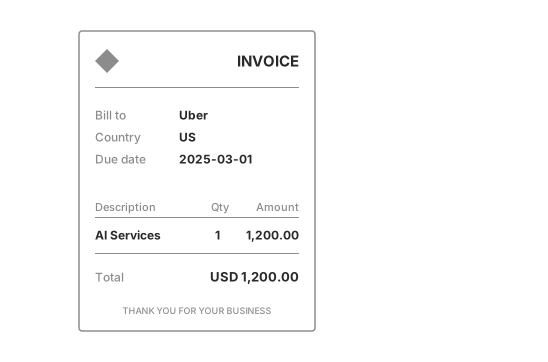
Some invoices are scanned or handwritten. Some run over many pages.
Each invoice carries 15 to 20 fields, and then its line items. A person reads them off the page and types them into a form.
Get them right and the supplier is paid on time. Mistype one digit and the supplier is paid the wrong amount.
Reading the fields off a document so a program can use them is called document processing.
2. Can rules do document processing?
How do you find the total on a bill? You look for the word Total, and read the number after it.
A program can follow the same rule: find a label on the page, and take the value after it.
Uber had previously tried to use a rule-based system, but it is quite rigid and does not intelligently process every invoice.
Here is a rule that reads two fields. It was written for one supplier's invoice.
import re


def read_invoice(text):
    number = re.search(r"Invoice No: (\d+)", text)
    total = re.search(r"Total: USD ([\d,.]+)", text)
    return {
        "invoice_number": number.group(1) if number else None,
        "total": total.group(1) if total else None,
    }


english = "Invoice No: 4810\nDue date: 2025-03-01\nTotal: USD 1,200.00"
german = "Rechnungsnummer: 4811\nFällig am: 01.03.2025\nGesamtbetrag: 980,00 EUR"

print(read_invoice(english))
print(read_invoice(german))
{'invoice_number': '4810', 'total': '1,200.00'}
{'invoice_number': None, 'total': None}The rule reads the first invoice. On the second, a German one, it finds nothing.
Every new layout needs a new rule. Uber's post says its older automation needed manual rule-setting for each new format, and it didn't scale.[1]
3. Images: OCR reads the scan
Did the people who typed these invoices in need a new rule for every format? They didn't. They knew what an invoice means.
What they did is build TextSense, which takes the invoice PDF, performs OCR to extract text and extracts the most relevant fields for every invoice.
Many invoices arrive as scanned PDFs. A scan is only a picture, and a program can't search a picture for a date.
So Uber's Vision Gateway reads the letters out of the image.[1] Reading text out of an image is called optical character recognition, or OCR.
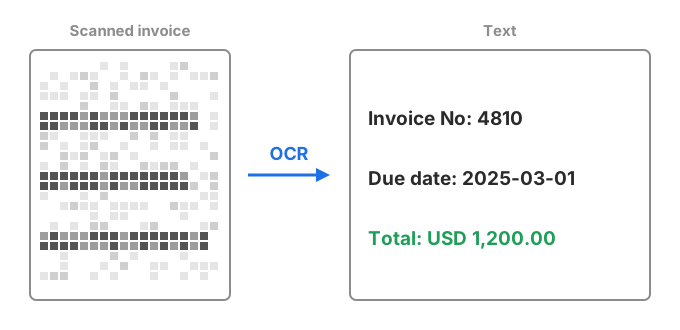
Then a large language model reads that text and fills in what a payment needs: the invoice number, the date and the amount. It reads every line item too.
Next, a post-processing layer applies Uber's business rules to what the model wrote. A person checks the result. Last, Uber's ERP system approves the invoice and pays the supplier.
Each invoice passes through these steps in order. Cadence, Uber's workflow platform, runs them.
4. Tables: which model reads the line items?
Could a model learn to read the table from invoices people had already typed in? Uber had a year of them.
The line items are that table: one row per item, with its description and its amount.
The team trained open models on that year: seq2seq, Llama 2 and Flan T5.[1] It kept 90% of the invoices for training and 10% for testing.
Training a model further on your own data is called fine-tuning.
Fine-tuned Flan T5 got over 90% of the header fields right, like the invoice number and the date. The first line item came out well too.
From the second line on, its accuracy dropped. It also wrote line details that weren't on the page. This is called hallucination.
Then the team tried GPT-4 as it comes, with no fine-tuning. It was the clear winner on overall accuracy and on line items.
Uber chose it for its "ability to handle complex, unstructured data".[1] The business rules stayed out of the model. The model predicts every field, and the layer after it applies the rules.
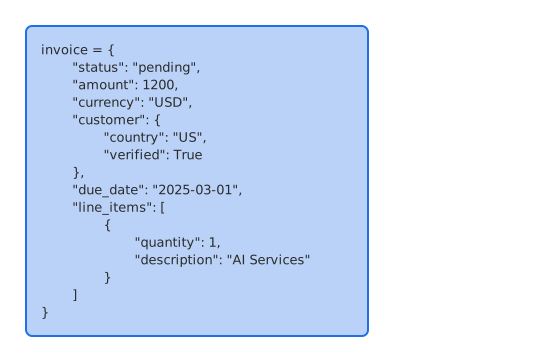
What comes out is one row per line item, in fields a program can use. In a RAG pipeline, those rows are what you index and retrieve, where the scan and the table were not searchable at all.
5. Where does a person check the model?
Would you pay a supplier on a model's word alone? Uber doesn't.
The fields go to a reviewer before the invoice is paid.[1] The review screen puts the PDF beside the fields the model read. Alerts and soft warnings point at what looks wrong.
A person who checks a model's work before it is used is called a human in the loop.
The human in the loop also corrects the model. Those corrections become labelled data, and suppliers that send many invoices with low accuracy are labelled first.
So, how much time did the reviewers save?
Remember the people who typed every invoice in?
But since most invoices go through, Uber has been able to save 50% of the manual workload that they had, leading to a 70% reduction in invoice processing time.
Uber's post gives the accuracy behind that time saved.[1] Overall accuracy is 90%.
That accuracy varies by invoice: 35% come out 99.5% right, and 65% more than 80% right.
The time saved also saved money: the system costs 25 to 30% less than the manual process.
Uber has been quite active in the AI engineering space.
One of the previous achievements was to build QueryGPT.
QueryGPT turns a question in English into SQL.[2] Uber estimates a query takes about 3 minutes with it, against about 10 by hand.
Summary
- Uber gets invoices from thousands of suppliers as PDFs, often scanned, with tables of line items.
- A rule finds a label and takes the value after it. Every new format needs a new rule.
- Images: TextSense reads the scan with OCR, then a large language model fills in the fields.
- Business rules run after the model, and a person reviews the fields before Uber pays.
- Tables: fine-tuned Flan T5 got over 90% of header fields right, but faltered from the second row and hallucinated.
- GPT-4 needed no fine-tuning. It won on overall accuracy and on line items.
- Manual work halved, handling time fell by 70%, and costs fell by 25 to 30%.
Sources
- Advancing Invoice Document Processing at Uber using GenAI, Uber Engineering, 17 April 2025.
- QueryGPT: Natural Language to SQL Using Generative AI, Uber Engineering, 19 September 2024.
